A backlog tool for two
I wanted a backlog management tool optimised for both me and Claude Code. I already had a backlog file for each project stored as a markdown doc, but they were mostly for Claude’s benefit and not easy for a human to skim. What I needed was a tool that was easy for me to browse, but that was also integrated into my Claude Code workflow.
Losing the thread
The trigger was starting to have more and more small projects, and forgetting where I was up to, what was done, and what wasn’t. I wanted to introduce a work tracking tool to keep track of what I’ve done, what I’m working on, and what I want to do in the future across all my projects.
I also love user story maps as a way of visualising work to be done, in a way that’s structured around the user experience, with a well-defined goal for each release. So I decided to move to a storymap-first work management tool. It only had to work for me, so I didn’t need the complexity of other tools out there.
Jira has a free tier that would have worked for my usage, and a great MCP integration, but it doesn’t support user story maps without paid third-party plugins. I looked at other storymap-first work management tools, but none of them had a product with strong LLM integration and a generous free tier. So I decided to build my own.
What are user story maps?
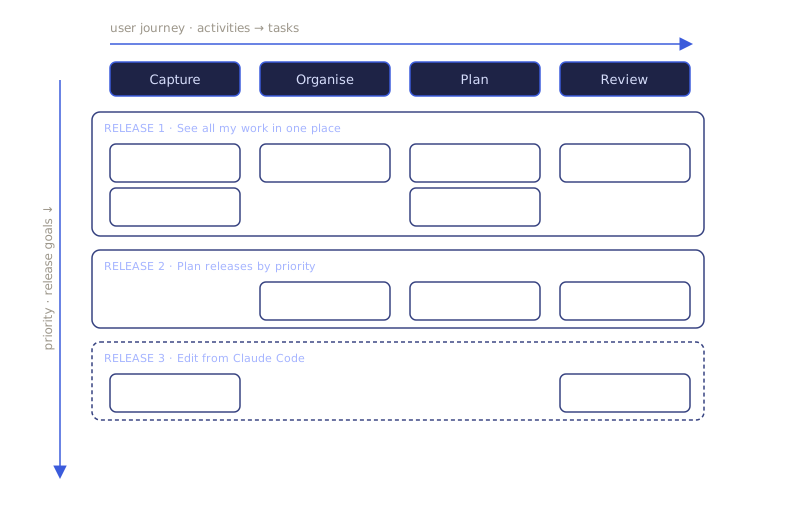
User story maps are a two-dimensional product backlog, pioneered by Jeff Patton. The vertical slices of a story map break down the user journey into high-level activities, and more granular tasks within them. Horizontal slices in a story map are product goals, organised with the highest priority at the top. They’re a fantastic way to hone down the scope of an MVP by staying laser-focused on what’s truly required across the user journey to meet the goal. The visualness of the map also often helps highlight gaps early on, and builds understanding of the end-to-end product in a way that a traditional flat backlog doesn’t.
What I built
Try itStorymap is the result, and I use it several times a day now, for two main things. First, when I have an idea for something to change in one of my apps, I can quickly open it and add the new change to the backlog in 30 seconds. Second, when I get an hour or two to sit down and work on my projects, I open storymap to orient myself on what’s still in flight to finish, and what are the top things to start next.
Markdown as a backend
As I was thinking through the architecture of storymap, I explored different data models, including various databases. They would have been much better in some ways, such as load speed in the UI and strictly enforcing a schema at the DB layer. But using a traditional database would have meant a whole lot of extra overhead building an MCP server, or some other way for Claude Code to read and modify the backlog. I decided to look at what I do now as an alternative approach: markdown files in a GitHub repo. It’s proven to work well with LLMs, but because they’re just plain text files without any set structure, it’s tricky to turn them into a reliable human-usable UI.
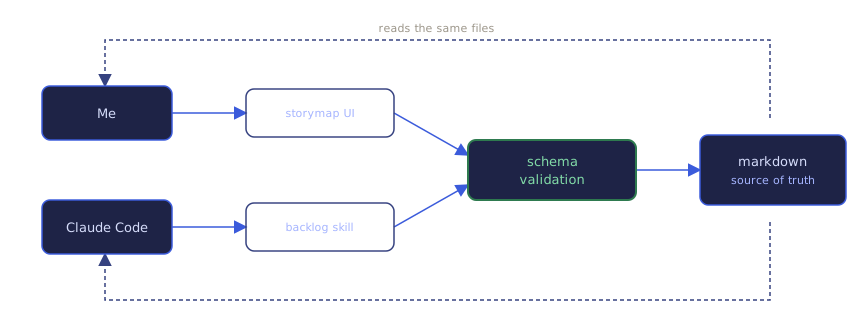
To solve the unstructured data problem, I defined a strict schema for backlog items, and (with Claude’s help) wrote a validation script to block any updates that don’t match it. Then I implemented a backlog skill in Claude Code, used for all interactions with my storymap-based backlogs. The validation script runs as part of the pre-commit hook in Claude code. For those unfamiliar, ‘hooks’ are ways to reliably run code every time Claude takes particular actions. The pre-commit hook runs every time Claude tries to commit code - so by running the schema validation in that hook, it’s impossible for LLM content that breaks the approved file structure to make its way into github.
The same script runs when saving backlog changes from the storymap UI. I’ve captured both edit points, so the storymap schema stays reliably enforced. Yes, I could go and manually commit changes that go outside of the schema. But it’s just me using this repo, so I know not to do that. If it became a problem, I could also add the schema validation to the CI/CD pipelines so that it’s run on commits or merges. But it simply hasn’t been necessary yet.
---
id: GM0kBMSueU
title: Short reference ID
status: open
task: XEKP2D7Iau
slice: 1_tUzMWBkc
effort: S
---
Currently when I'm talking to Claude about backlog items I
have to explain what it is and Claude needs to hunt for it.
Add a short (just a few characters) reference ID to backlog
items so that I can just use the reference to match accurately
Containing the risk
Using markdown files as my backend means any changes from the storymap UI need to get committed to my repo, which means I needed to give a backend exposed to the open internet write access to my github account. The key question was: how do I make the level of repo access for storymap as fine-grained as possible, so that the impact of any issues or security gaps is capped at only the backlog files, and not everything else in the repo.
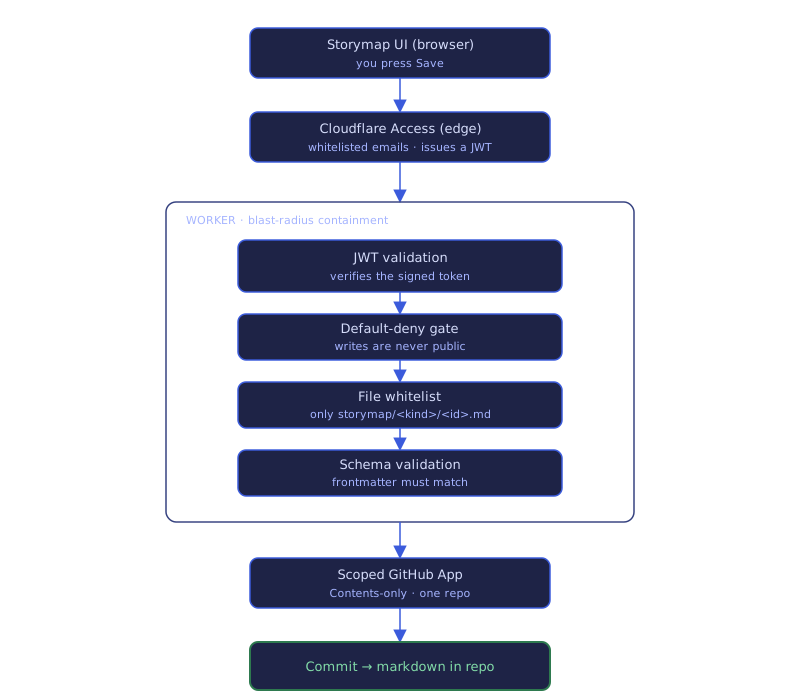
I focused on three things. First, strong authentication for committing backlog edits. Second, a file whitelist in the backend, to avoid any non-backlog files being written. Third, scoped GitHub App access, to limit what other actions are possible at all.
Making it feel right
The hardest thing to get right was the UI. While it looked OK at first and was technically functional, it took so many small iterations for it to feel how I wanted it to, especially for interactions like dragging a card to a different cell. With my agentic coding workflow I was able to push small UI/UX changes live within 10 minutes, and test them in the real app, getting the many iterations done far faster than a traditional design approach using figma mockups/prototypes first.
Worth building?
Storymap keeps the simplicity and LLM-readability of markdown files, while also putting them into a UI that helps me visualise the experience, think through opportunities, and make better decisions. I think it was worth it - and also a lot of fun to build. In the process I learnt way more about hover, click, and drag UX than I ever thought I would.
Building your own tool like this is worth it more and more often, as the effort to build functional software to solve specific tasks continues to decrease. I wouldn’t for anything mission-critical, but for productivity accelerators I use regularly, the benefits of building something exactly optimised for my personal workflow are compelling.
What's new
16 May – 2 Oct 2026 · 24 entries-
Stale links clear out of the work tracker
The tool that tracks planned work now clears out links to files that have been moved or deleted, so stale references stop building up.
-
Clear a stuck save without losing your other changes
Storymap now helps when a save fails, on a phone as much as a desktop.
- You can now remove a single change that can never save, so the good changes queued behind it get through instead of being discarded together.
- A failing save now offers a Copy debug info button, so you can paste the details into a chat and diagnose it without developer tools.
-
Saved edits to a board now show up straight away
Today went on a caching bug that hid saved changes from signed-in editors.
- When you save changes to a board, you now see them straight away, instead of an old copy your browser had held onto for up to four hours.
-
Retire a design check that flagged differences that weren't real
An automated check that compared storymap’s design mockups against the live app was removed, because it kept reporting differences that were never real.
-
Linking plans to backlog items survives running from a worktree
A small correction to how plans get tied back to their backlog items.
- Fixed the plan-to-item linker so it uses the right file path when run from a separate working copy, where before it could point at the wrong place.
-
More detail when a storymap request is slow or fails
Storymap now records its own internal steps in more detail, so a slow or failing request can be traced to the operation behind it.
-
Saving no longer loses your edits when you close then reopen an item
Storymap got a nudge to where it opens and a fix that protects work you haven’t saved yet.
- Opening storymap now takes you straight to the Planner board, instead of the general workspace board it showed before.
- Saving no longer fails when you close an item then reopen it before saving, which used to leave your edits stuck and unrecoverable.
-
The loading screen looks like the board it stands in for
Two user-flagged interface problems, plus storymap’s share of the workspace tracing rollout.
- The coloured dot beside each project name is gone, since it said nothing the name beside it didn’t.
- Behind the scenes the board joined the workspace tracing rollout, so a slow save or snapshot now shows where the time went.
- The plan for rolling tracing and analytics across every app in the workspace was written down and sequenced.
- Fixed the loading placeholder, which collapsed into thin slivers on desktop and stacked vertically on mobile instead of looking like the board.
-
Creating new items in a storymap works again
A storymap had been silently refusing everything you tried to add to it.
- You can now add a task, slice or activity to a map again, after a bug quietly rejected every one of those.
- Setting up a new storymap works again too, blocked by the same bug until now.
-
Clear out a broken check in the story-mapping tool
The story-mapping tool carried a leftover check that kept failing because the file it read was deleted weeks earlier, so it has now been removed.
-
Slice menus no longer open off-screen
On a wide board you’ve scrolled sideways, the three-dot menu on a slice now opens on screen, so the button works instead of doing nothing.
-
Story maps fit a phone screen with less sideways scrolling
Most of the work went into how a story map looks on a phone.
- On a phone, each slice now sits as a full-width heading above its cards, freeing the screen space the old frozen left column used.
- Story cards are bigger on a phone, showing two across with a third peeking to signal you can scroll for more.
- Fixed a mobile slice heading that scrolled out of view sideways, and task names that sat above the centre of their row.
-
Refer to a storymap card by a short code
The storymap board now gives each card a short code you can quote when you talk about it, instead of its full ten-character id.
-
Columns widen sooner as a slice fills up
The story map’s grid got a little tidier.
- A column now doubles in width once a slice holds two cards, not three, so those cards have more room to read.
- Fixed the drag handle and menu icons on the map’s headers, which could sit above centre in rows of uneven height.
-
Back out of edits you can't save
Most of the work went into the map editor.
- If you edit a map you can’t save, you can now discard those edits in one click instead of reloading the whole page.
- Fixed handles and menus too small to tap, unreliable task drops between two activities, and an error when editing a card just after closing it.
-
Reordering the map by dragging now lands where you aim
Most of the work went into dragging items around the map, with a fix for cards on phones.
- You can now drop a dragged slice, activity or task anywhere along its row or column, so it lands where you meant to put it.
- A full-length line with a plus marker now shows exactly where a dragged item will land before you let go.
- Fixed mobile item cards so tags no longer get cut off and cards line up evenly down the column.
-
View a story map without signing in
Storymap opened its boards to signed-out visitors, and got easier to rearrange.
- You can now open a board marked public without signing in, so showing your story map to someone is just a link.
- You can now drag slices, activities and tasks by their handle to reorder them, or move a task into another activity’s column.
- When your session has expired, a sign-in link now appears in the footer, so you can get back to editing without hunting for it.
- Fixed a new-card form that kept the last cell’s details, board edits taking up to twelve hours to reach viewers, and sluggish card dragging.
-
Saving a story map now takes seconds instead of half a minute
Most of the work went into the story map board, on speed and on editing.
- Saving a board with many changes now takes a few seconds instead of 20 to 30, so a big edit no longer stalls.
- Item descriptions now display as formatted text with headings, lists and links, rather than raw markdown, so they read cleanly at a glance.
- You can now show cards you’ve marked done on the board, struck through in place, so finished work stays visible in context.
- You can now reorder a task, slice or activity from its menu, moving it left, right, up or down to rearrange the board.
- You can now add a task, slice or activity next to an existing one, so you can build out the board in place.
- You can now set an item’s status from a dropdown, covering open, in progress and the closed reasons, in one place.
- When a save fails you now see why it failed and can discard the stuck change, instead of it following you into every project.
- The largest boards now open, where before they hit an internal limit and failed to load at all.
- Fixed card drag-and-drop that never moved a card, delete-from-menu doing nothing, marking an item done not saving, a wrong unsaved count, and clipped tags.
-
Drag cards around the story map
The story map turned into something you rearrange and edit in the browser, rather than only read.
- You can now move a card to another cell by dragging it, or by tapping a destination, instead of editing files by hand.
- You can now change a card’s task and slice from its detail panel, where those fields were previously read-only.
- You can now close an item and record the outcome as done, won’t do, or duplicate, so the board shows how each item ended.
- Fixed map menus opening the wrong panel, cards vanishing after saving, misaligned columns, titles cramped to one word per line, and a duplicate close button.
-
Storymap rebuilt to a new design
Storymap maps a project’s backlog as a grid of activities, tasks and slices, and its whole interface has been rebuilt to a new design.
- You can now delete an item, or a whole activity with its tasks and items at once, so scrapped work leaves the map cleanly.
- An item can now show that it’s in progress, not just open or closed, so you can see at a glance what’s underway.
- An item can now link out to its design files, alongside the plan links it already carried.
- A brand-new, empty project now shows an Initialise action to create its first story map.
- You can now see which account you’re signed in as, and sign out, from the settings page.
- You can now rename or delete a tag across every item at once, so a tag change isn’t an edit to each item.
-
The design mock-ups now check themselves against the design system
The design mock-up files that every screen of the app is built against finished a long clean-up.
Every visual value in them, from colours to spacing, is now verified by script rather than by eye. The checks caught real faults, including mobile layout rules that had never fired, so the mock-ups now display correctly on a phone.
-
Sketching out a redesign of the story map
The next version of the story-mapping screen is being worked out as mock-ups, before any of it gets built.
-
See and rearrange your work on a single story map
Storymap is a tool for laying work out as a map of activities and slices, and it came together into something you can use.
- You can see a project’s work as a grid of activities and slices, so its whole shape is visible at once.
- You can switch between projects from the top bar, each keeping its own map and archive.
- You can add an item and set its task, slice, effort and tags, so it lands in the right place on the map.
- You can open any item to edit its title, notes and details, with your changes kept as you go.
- You can drag an item from one cell to another to regroup it, and the map updates straight away without a reload.
- You can close an item as done, won’t do or a duplicate, and it moves off the map into the archive.
- You can browse everything you’ve closed in a separate archive, filtered by how each item ended.
- You can save several edits together, and if the same item changed elsewhere, a panel walks you through merging the two versions.
- Fixed a map that loaded with no items, modal buttons that stacked as two competing options on phones, and several mislabelled buttons and options.
-
Storymap moves from idea to a full design and plan
Storymap’s whole design got worked out, from the screens and visual style to the technical plan behind them.