Remind me later
Calendar alerts assume you'll act the moment they fire. This planner assumes you won't, and follows you up until you do.
Try it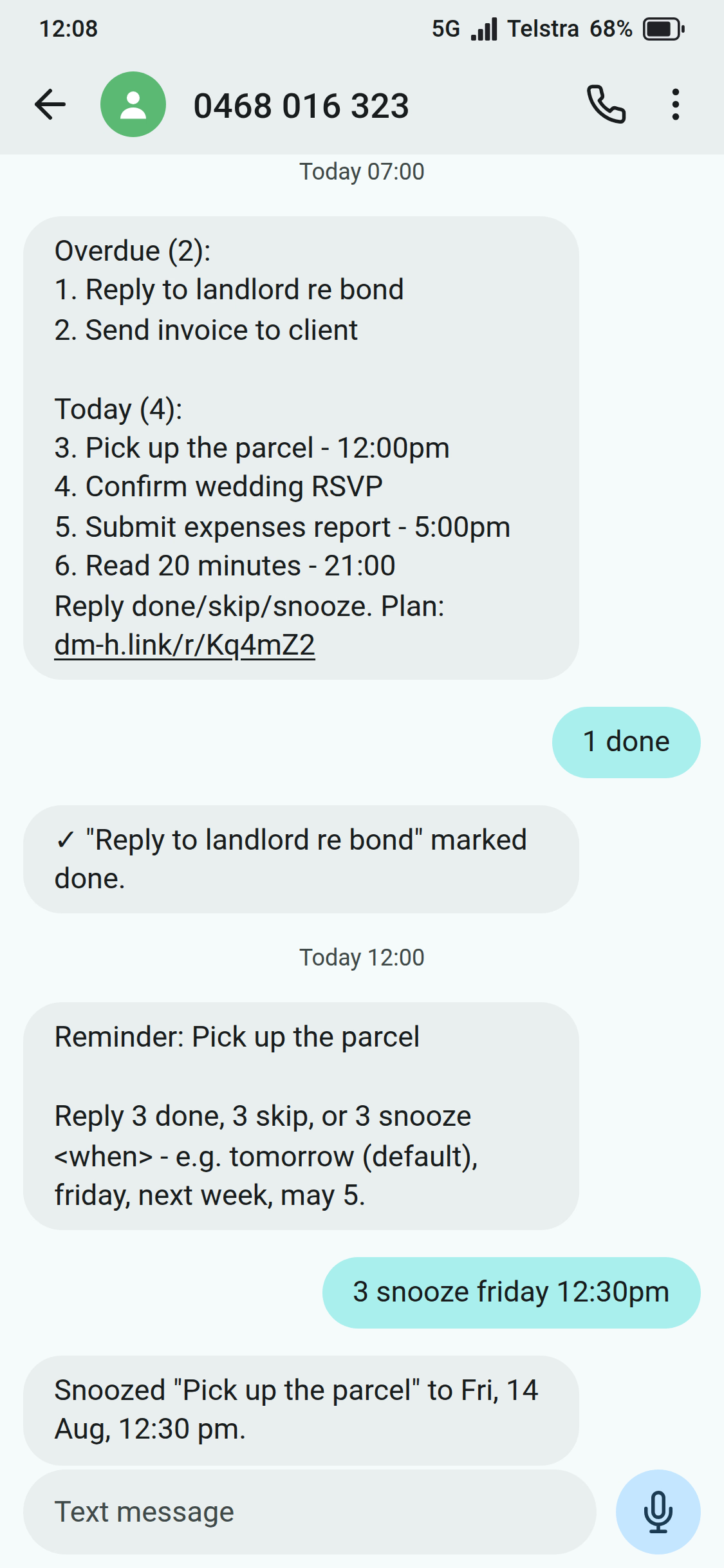
Problem
I have a problem. I’m really forgetful at remembering to do things, even when I have the best of intentions. I’m in awe of my wife every time she remembers an appointment she booked weeks or months ago. I’ve tried so many things. I tried calendars, and I keep getting the reminder, looking at it, thinking “yep, I’ll do that soon,” and then forgetting to do it. I’ve tried methodologies like Getting Things Done, and I love the idea, but I’m just not good at keeping up the maintenance of those task management approaches. I’ve tried a range of apps, and none of them quite do it for me.
The other thing is I find it easiest to remember things and easiest to engage when using SMS. SMS is what I pay attention to. So I thought, why not make a Getting Things Done inspired task management app that relies on SMS as a primary interface, with reminders that keep nagging me into marking things off, and a power-user-friendly UX.
What it does
Getting Things Done (GTD) is a productivity system aimed at getting things out of your head into structured lists, keeping those lists organised so your activities are planned, and conducting a weekly reflection to update them. It’s a great system if you keep on top of it, but I never could. Remind me later builds an automated system around my own flavour of GTD, helping me stay on track and do the things I want or need to do.
SMS-first reminders
Call me old school if you want, but I like SMS - so I made it one of the main interfaces for Remind Me Later. I get reminders via SMS at the scheduled time, with follow-ups if I haven’t completed a task. I can reply by SMS to mark tasks done, snooze them to later or to another day, or just skip them. This is the key thing that helps me commit, because I can’t just ignore it. It’s not something sitting away on my desk that I have to remember to go back to.
The trade-off is the cost. SMS isn’t free; a few cents per pop turns into real money at scale, which is why most apps don’t do this. I’m not at scale. I’m building this for myself, and a dollar or two a week is worth it for an app that does exactly what I need and helps me stress less about remembering things.
Auto-carryover
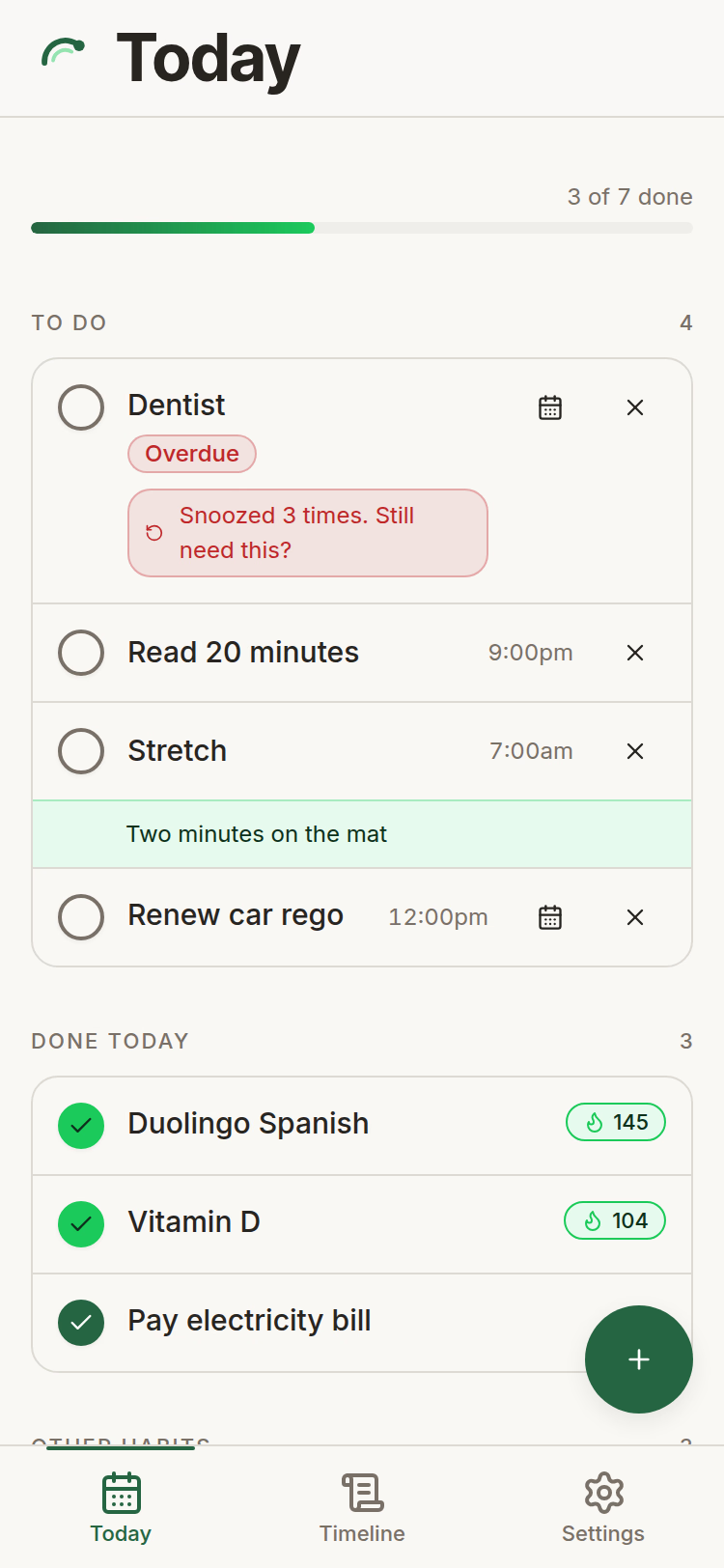
To solve my “I’ll do it soon” calendar problem, Remind Me Later is built so that absolutely nothing can dissapear without an explicit action. If I forget to mark a task off, it comes back the next day as overdue. At that point I can make a decision to Skip, Snooze, or Do.
Today and timeline
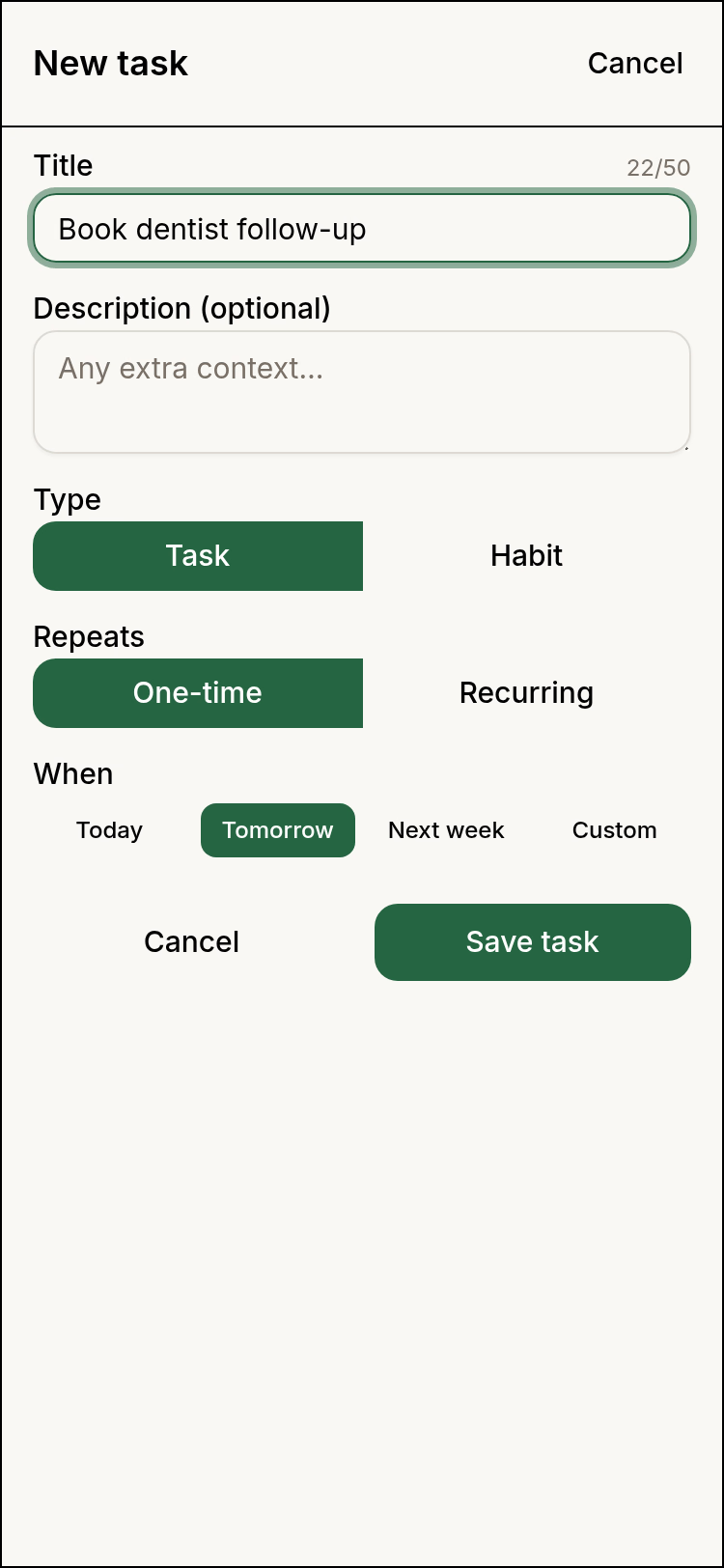
Capture is for everything new. Designed to be as low-friction as possible, with smart defaults and minimising the number of taps to reach each option.
Today shows all of today’s reminders, with one-tap options to mark as done, snooze to another time or day, or skip. To speed up actions I purposefully avoided confirmation prompts, instead opting to provide a time-limited undo option for destructive actions.
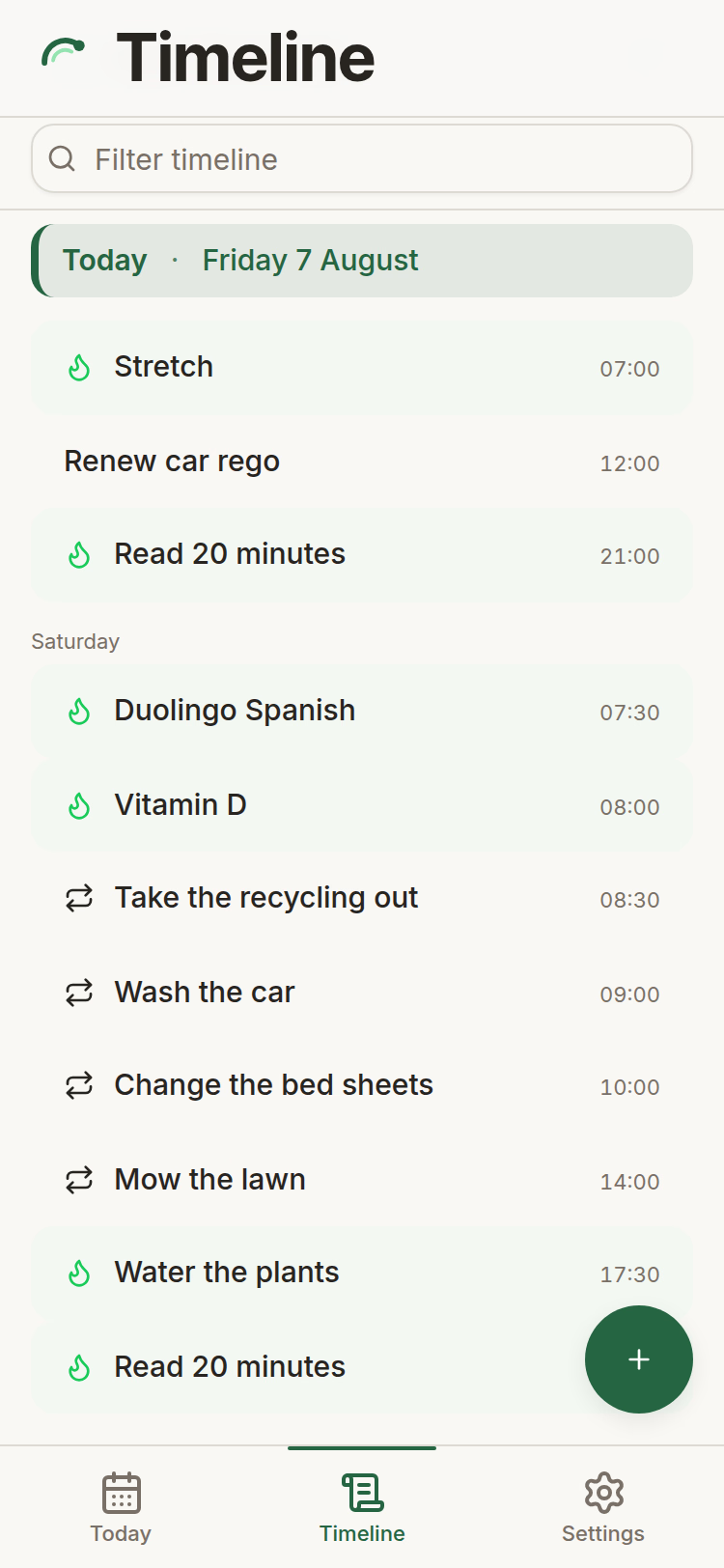
Timeline shows me everything I’ve already added in the future, in a scroll-friendly timeline. To be honest I don’t use this view as much as I expected to: getting tasks out of my head and into Remind me later, combined with the start of week review, leaves me with enough peace of mind that I don’t feel the need to repeatedly scan through what’s coming up.
Habit tracking
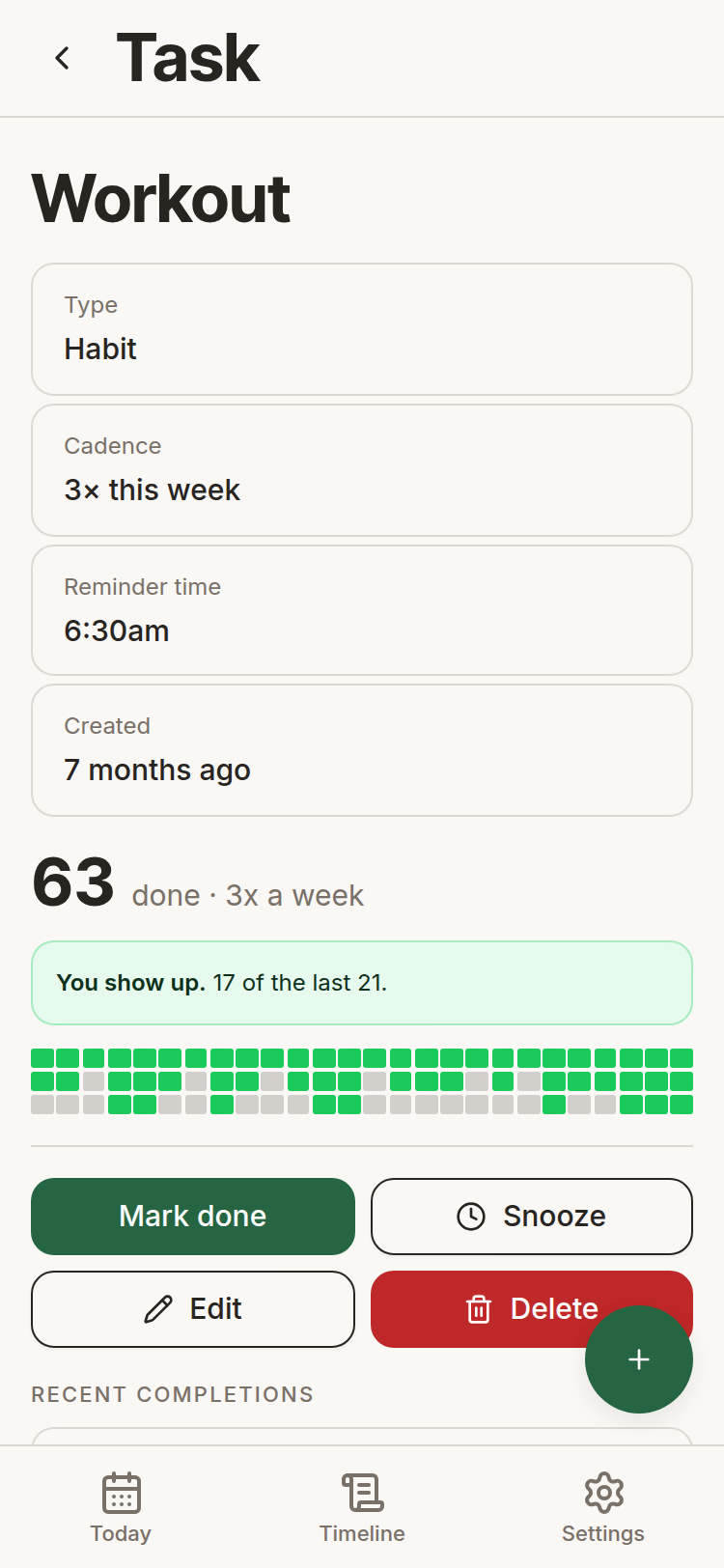
Another feature I introduced recently is habit tracking. Habits are things I want to do more - but often don’t get the chance to. I don’t like the negativity of ‘streaks’ that many other apps use - where fear of losing the streak is used as the motivator. Instead, Remind Me Later gently motivates with positivity using features like:
- a completion count that always ticks up rather than a streak that gets wiped after missing one occurrence
- LLM-generated nudge content that shows up when you start missing a habit to help you get back into it
- feel-good celebration animations when you mark off a habit after you missed it a few times
Weekly review
The weekly review is where I sit down for five minutes and plan all of the things for the week and when I’m going to do them. I can shuffle things around and push others to future weeks to make the plan achievable. It’s a guided flow with no skipping; you have to complete each step. Honestly, a lot of people would probably hate it. It really, really works for me.
This is the key part of the workflow that creates a smooth experience. By deferring as many decisions as possible to the weekly review, capturing a task becomes much easier. I don’t have to plan a specific day or time for things months in the future. I can capture it in 5 seconds for a week or month in the future, and rely on the weekly review to surface it for more specific scheduling closer to the date.
Next
I’m using Remind me later every day, but I still have a lot of ideas in the backlog. I’m thinking of building a multiplayer feature where you can team up with a partner and have both shared and individual tasks in one place.
What's new
26 Apr – 5 Oct 2026 · 68 entries-
Changing a habit's frequency no longer rewrites its past
Changing how often a habit or repeating task repeats now only affects future dates, so your past history stays exactly as you logged it.
-
A task stuck as overdue can be ticked off again
A couple of taps that seemed to do nothing were actually being refused, and now the app tells you so.
- You can now tick or skip a monthly task stuck showing as overdue, where before both taps were refused and it never cleared.
- Fixed refused taps on Today and on overdue one-off tasks quietly rolling back, so they now show a short message saying why.
-
Habits ticked off early no longer show as done today
A repeating habit you finished earlier in its cycle no longer reappears under Done today when its due date arrives.
-
Screens stop hiding your data behind an error message
Four of your screens no longer replace the information you are looking at with an error message when an update fails quietly in the background.
-
Give a one-off task a time and silence its reminder text
A task set for a future day can now carry a time, so the reminder text reaches you at the moment you picked.
- You can now set a time when creating a task for tomorrow or a date you pick, so it texts you then.
- When the date you pick is today, times that have already passed are hidden, so a task cannot text you seconds later.
- You can now switch off the reminder text on a timed task as you create it, so it sits in your list silently.
- You can now silence that text later from the edit drawer or the task detail screen, not only when creating the task.
-
Screens stop going blank while you change something
A run of screens that used to blank out while you were partway through something now hold still.
- You can now tell whether undoing a snooze on Today worked, since a failed undo used to give you no message at all.
- Fixed the task detail, Settings and Today screens flashing to loading bars during a change, and the walkthrough losing its place when adding a task.
-
Choose which habits keep texting you a reminder
You now decide, task by task, which of your habits keep sending you a reminder text.
- Turning off a habit’s reminder text leaves its line in your morning briefing, so you still see it planned for the day.
- A one-off task shows no switch, because it never sent that follow-up text.
- Your morning briefing now lists just your tasks, without an extra suggested first step printed under each off-track habit.
- You still get that first small step in the habit’s own reminder text and on its off-track card in the app.
-
Behind-the-scenes work on the task schedule
Nothing in the app changes for you today, and the work corrected the stored task schedule so a task moved to another day keeps the time it was owed for.
-
Moving a repeating task no longer breaks its schedule
Snoozing a repeating task to another day now keeps the rest of its schedule intact.
- You can now move one day of a task that runs on several weekdays, and the other days stay put instead of vanishing for that week.
- The snooze sheet now offers only dates a task can move to, and says when it can’t move further while still letting you skip it.
- Ask by text to move a task past its next turn and you now get a reply naming the last date it can reach.
- Fixed undo restoring the wrong days after a move, a task repeating every few months showing on two days, and a confusing move-by-text reply.
-
Snooze an overdue monthly task to tomorrow again
An overdue task that repeats monthly can now be snoozed to the next day without opening the calendar.
- You can now move an overdue monthly task to tomorrow with the quick snooze button, where before only the calendar picker would accept it.
- Fixed the tutorial’s demo habit sometimes missing its first day, and a sample task landing on the wrong day for some time zones.
-
Undo a skip on the daily review
Skipping a task on the daily review used to happen with no visible response at all.
- You can now undo a skip on the daily review, so a task you skipped by accident comes straight back for six seconds.
- Fixed error messages and the snooze drawer’s own messages never appearing on this screen.
-
Skip a task with no set time on the daily review
A task with no set time on the daily review can now be dismissed for today in one tap, and Skip sits in the same spot on every row.
-
Snooze a task to a day you pick
Snoozing a task to a day you choose now works on a phone, where before most of the calendar ignored your taps.
- You can now tap any day in the snooze calendar to move a task there, where before most days on screen did nothing.
- The calendar now greys out days it cannot use, past days and days the task already runs on, so you can see them before tapping.
- You can now snooze a repeating task to its own weekday in a later week, which the app used to refuse without a word.
- Setting up your profile now flags a mistyped time zone on the spot, so you correct it there instead of hitting a vague error later.
- Fixed a Tomorrow button greyed out on Sundays, unavailable days shown too faint, and a line above the skip button that just repeated it.
-
Keeping the schedule behind your repeating tasks correct
Nothing on screen changed, but the stored schedule behind your repeating tasks now stays correct on its own, keeping later work on solid footing.
-
Less clutter on the Today screen
Today now shows your day with fewer numbers and labels crowding the screen.
- The running count above the progress bar and the counts beside each section heading are gone, so the screen reads more cleanly.
- Habit checkboxes now tick in the same colour as task checkboxes, so the two match.
- Fixed the day-of-week picker announcing itself wrongly to screen readers, and a gap that could show in your habit history.
-
Preview database moved to a new region
The planner’s preview database was rebuilt in a new region and reconnected, with nothing that touches the live app you use.
-
Stronger test checks on the reminders and sign-in code
The planner’s reminder and sign-in code got a tougher kind of test check, which closed two gaps where a test ran the code without ever checking the result.
-
Reopening the planner after a break now loads reliably
Returning to the app after being away is smoother, and a genuine outage is easier to spot.
- Opening the app after an hour idle no longer stalls on the loading screen, because the app no longer waits on a slow database write before showing your tasks.
- When the server truly cannot be reached, the reconnect screen now appears in about 16 seconds instead of 25, so you are not left staring at a spinner.
-
Overdue tasks in the weekly review now work like the Today screen
The weekly review’s overdue tasks were rebuilt to behave like the tasks on the Today screen.
- You can now mark an overdue task done by tapping a circle, and tap it again to put it back, so no menu is needed.
- Archiving an overdue task now shows an Undo button, so an archive by mistake takes one tap to reverse.
- Each plan row now leads with an icon and shorter labels, so you can tell habits, chores and deferred tasks apart at a glance.
- Fixed long overdue titles overlapping the buttons, confirmation and error messages that never appeared, and an archived row sliding out of line with its neighbours.
-
See the celebration glow when you finish something
Completing a task or habit on the Today screen now shows a glow around the row, so a completion feels finished, where before that glow never appeared.
-
The weekly review banner waits for your review time
The weekly review reminders on screen and by text now line up.
- The weekly review banner now appears at your configured review time, so it prompts you alongside the text message instead of nagging from midnight.
- Fixed the weekly review text message linking to the week that was ending, so tapping it now opens next week instead of a dead end.
-
Timeline rows line up and the Today marker gets simpler
The Timeline got a couple of visual tweaks so it is easier to scan.
- One-off tasks now show a small circle beside the title, so every row lines up with your habits and repeating tasks instead of starting further left.
- The marker for today is now a green “Today” label with the date and a thin line, the kind of divider you already see in messaging apps.
-
The app now stays a tidy column on wide screens
A short day of layout and navigation polish.
- On a computer the app now sits in a centred, phone-width column instead of stretching across the screen, so it stays easy to read.
- Task detail now has a back arrow in its header, so you can get back to your list even when you opened the task from a text message.
-
Log a habit straight from Today
Most of today went on habits, on the screen and by text message.
- Every habit you haven’t logged today now sits at the end of Today, so recording one is a tap instead of opening a separate picker.
- You can now move a repeating task or habit to another day by text, where before the reply told you to open the app.
- Fixed an add button blocked by the saved-task message, daily habits labelled weekly, a misaligned history grid, a stuck weekly count, and clumsy messages.
-
Every habit shows up after you plan your week
The weekly review and the Timeline both got attention.
- You can now see every habit’s progress on the screen shown after planning your week, including flexible ones left off before.
- Fixed those progress grids showing too small, awkward habit-nudge wording, and the Timeline losing today’s marker for people in Australian time zones.
-
Behind-the-scenes work on keeping past habit days accurate
Work continued on making each recurring habit record what happened on a day, so a past day stays correct after you change its schedule.
-
Undo a skip that used to get stuck on repeating tasks
Undoing a skip was the focus, both on the day something was skipped and later.
- You can now undo a skip on a task that repeats every few days, weeks or months, where before tapping Undo just returned an error.
- A skipped item now keeps an “Undo skip” control on both Today and its detail screen, so you’re no longer stuck once the brief undo message disappears.
-
Groundwork for the new reminder scheduling engine
Checks that compare a new way of scheduling reminders against the current one cleared their last blocker, so the trial period before switching over can start.
-
Groundwork for more reliable recurring tasks
This was internal work on how repeating tasks and habits are stored, with nothing to see on screen yet.
-
Habit reminders reach the habits that were missing them
Text-message reminders now reach two kinds of habit that were quietly missing out.
- Habits you do a set number of times a week now get their own reminder text, where before that type never sent one.
- Fixed a reminder for a habit you moved to a chosen day arriving on its usual day instead of the day you picked.
-
See the dates you last did a habit or task
The detail page for a habit or repeating task gained a record of when you actually did it.
- You can now see your last ten completion dates on a task, so you can answer “when did I last do this” without reading it off the grid.
- Fixed missed days on a habit grid showing as blank instead of grey, and the Today heading scrolling away instead of staying pinned at the top.
-
Log a habit on any day and have it count
Flexible habits with a weekly target now count every completion, whenever you log it.
- You can now log a make-up completion on a day the habit wasn’t scheduled, so a missed occurrence still counts toward your weekly goal.
- Completions beyond your target now count as bonuses, so a strong week can read four of three instead of stopping at the goal.
-
Completing a task no longer flickers a different colour
Ticking off a task used to flash one green then settle on another, and now finished tasks and habits each keep a single, consistent colour.
-
Pop-up messages are clearer and easier to act on
The small messages that confirm an action or offer an undo got a full going-over.
- These messages used to blend into the background; they now sit on a clear card, so you can see what just happened.
- They moved from the top to the bottom of the screen, so the undo button is within thumb reach when you need it.
- The window to undo a skip or delete grew to six seconds, so a mistaken tap is easier to catch.
-
No more timeouts when you return to the app after a break
The work went into what happens when you come back to the app after leaving it sitting idle.
- Returning after a while no longer freezes on a timeout, so you get straight back in instead of retrying a few times.
- Signing back in after being away is now quicker, so you spend less time waiting to reach your tasks.
-
Timeline history no longer starts a day early for Australian users
The app went through a large internal tidy-up you won’t notice, alongside one fix to how the activity timeline picks its starting week.
-
Prompts and the setup tutorial get a cleaner look
Most of the visible change landed in the banners and prompts.
- The setup tutorial you get by text now shows a step counter, so you can see how far through it you are and how much is left.
- The weekly review prompt and celebration banners got a plainer look, with a small action button in place of a full-width one.
- Fixed recurring chores appearing as habits on the Today screen, weekly reviews counting a moved habit as missed, and one person’s error halting reminders for everyone.
-
A cleaner, grouped layout for the Today screen
The Today screen changed how your tasks and habits are laid out and completed.
- Your tasks and habits now group under labelled headings with counts, so you can see at a glance what’s left, done and skipped.
- You mark anything done with a single tap on its ring, and completing one plays a short celebration, so the screen feels more responsive.
- Fixed row spacing and controls that drifted out of alignment on wrapped titles, and removed a duplicate Today heading at the top of the screen.
-
See the date and your progress at the top of Today
The top of the Today screen was reworked to keep the useful parts in view.
- The Today screen now shows the date and a larger title, and its progress bar stays pinned as you scroll, so your progress stays visible.
-
The celebration when you finish a habit is finally visible
Today was about making a finished habit feel good, and reaching the ones that had gone missing.
- The little celebration when you finish a habit now plays on the row you tapped, so you see it instead of missing it off the bottom of the screen.
- A progress line at the top of Today shows how much is left, and clearing the last habit ends the day with a small finish.
- You can now scroll to and log older habits in the “Log another habit” list, which used to sit off the bottom of the screen with no way to reach them.
-
Planned the next round of planner reliability fixes
A code review checked how the planner held up after its recent features, and mapped out the fixes and tidy-up that come next.
-
More detailed internal monitoring
Behind-the-scenes monitoring now records more detail about how the app’s parts work together, so faults can be traced and fixed faster.
-
Snooze a recurring task to a future date without it coming back
Today’s visible work was fixing how a recurring task moves to a future date.
- You can now push a repeating task or habit to a later day and it stays there, instead of returning to Today on the next refresh.
- A snoozed occurrence no longer counts as a missed habit, so moving one to another day doesn’t break your streak.
- Undoing a snooze that crosses into a later week or month now reverses the whole move in a single tap.
-
Behind-the-scenes upkeep on the planner
The planner got a round of internal maintenance that changes nothing for anyone using the app.
-
Mark a habit done on a day it wasn't scheduled
Most of the work went into habits, with a handful of weekly-review fixes.
- You can now mark a habit done on a day it isn’t scheduled, from Today or the habit’s page, so a make-up counts.
- A make-up fills in the day you missed so it shows in the habit’s history, while an extra one is logged as a bonus.
- Any off-schedule mark can be undone with one tap, in case you picked the wrong habit.
- Fixed the weekly review listing chores on the wrong weeks, a placeholder ‘Every N weeks’ label, and a bounce home after committing a plan.
-
The daily review link in a text message now works after your login expires
Two small annoyances are gone, one when opening the app from a text message and one on the Today screen.
- You can now open your daily review from the text-message link even after your login expired, where before it would just fail to load.
- Fixed the habit count on the Today screen, which kept showing the old total after you undid a completed habit, until the next refresh.
-
Get a small next step when you slip on a habit
A habit nudge that was meant to help you restart had quietly never appeared for anyone, until now.
- You now get a suggested small step to restart a habit you’ve fallen behind on, shown in the app and sent by text.
- A habit you keep skipping now counts as falling behind, so it gets a restart nudge instead of reading as on track.
- The suggested step refreshes each day, so it reflects where you are now rather than a stale suggestion from earlier.
- Fixed a monthly habit landing on the wrong week when re-planned twice in a month, and one flagged as behind too early.
-
A clearer picture of how your habits are going
Habits now build encouragement around what you’ve done, instead of dwelling on a missed day.
- Each habit shows a running total of times you’ve done it, so progress builds up instead of resetting after a missed day.
- You can now see each habit’s history as a grid on its detail page, so you can spot patterns and stretches at a glance.
- When you fall behind on a habit, it now suggests one small step to restart, both in the app and by text message.
- When you log a habit after missing it a while, you get a small celebration that never mentions the gap, so coming back feels good.
-
Plan your week on one screen
The weekly review is now a single screen you plan and commit in one place.
- You can now plan and commit your week on one screen, so committing no longer means a separate confirm step and a static done screen.
- A committed week with work left to place now opens ready to edit, so you can adjust the plan without starting over.
- Fixed the weekly review opening on a read-only recap you couldn’t edit when reached from the dashboard.
-
Move a repeating task instead of skipping it
A task that repeats every few months could only be skipped when you snoozed it, and can now move to a day you choose.
-
A brief server problem no longer logs you out
The app used to react to a brief server problem as though you had been signed out.
- You now stay logged in through a brief server outage, where before it bounced you to the login page and login appeared to fail.
- When the connection drops you now see a reconnect screen that recovers on its own, instead of a login page.
-
Planner's backlog moved to a structured board
The planner’s list of fixes and planned features moved out of one text file into a browsable board organised by release goal.
-
Choosing whether a task repeats is now an obvious toggle
The add-task form and a few planning screens got some attention.
- You can now set a task to repeat with a clear full-width toggle, instead of a small checkbox that was easy to miss.
- Fixed the timeline’s today marker hiding behind the filter bar, weekly review showing a just-done task as overdue, and snoozed tasks lingering in daily review.
-
Plan your week in fewer steps
The weekly review, where you set up the coming week, lost the steps that got in the way.
- Overdue one-off tasks now sit at the top of the planning step, so a single leftover task no longer blocks you from planning anything.
- You no longer look back over last week before planning, so the review stays focused on the week ahead.
- The final screen is now a single prompt, so you commit your plan without re-reading a summary of choices you just made.
- Fixed rows in the weekly review shifting sideways depending on their state, which left assigned and unassigned items misaligned.
-
Leave a finished weekly review without getting stuck
Finishing a weekly review that was already committed, with nothing left to schedule, now ends on a Done button instead of a dead-end screen.
-
Stay signed in with the planner open in two tabs
The planner no longer logs you out when it is open in two tabs at once and the tabs briefly compete to refresh your login.
-
Return to the timeline and land on today
The timeline now jumps back to today when you switch to its tab, where before it could stay stuck away from the current day.
-
A round of testing and safety-check work
This was housekeeping on the automated tests, the safety net that catches mistakes before any change reaches people using the planner.
-
Schedule a daily-review task in a single tap
The daily review screen and the morning text message both got some attention.
- Picking a time for a task in your daily review now files it and clears it from the list, with no separate confirm step.
- Your morning text message now fits more of your day, so fewer tasks get cut when the list is long.
- Fixed an overdue badge that clashed with its neighbour and showed an unhelpful month, and trimmed repeated notes from the morning message.
-
Deleting your account now clears all of your data
Deleting your account now removes the reminder records that used to be left behind, so nothing of yours lingers after you have gone.
-
Your weekly review text message arrives on Sunday again
Reminders and repeating tasks got most of the attention.
- Your weekly review reminder sends on Sunday again, after a scheduling bug silently blocked it for the past two weeks.
- Fixed text snoozes saving the wrong time, snoozed tasks lingering on Today, and repeating tasks showing on the wrong days in the timeline.
-
Every text reply now gets an answer
If you text the planner more than once in a day, every reply now gets a response, not just the first.
-
Your morning reminder text keeps its task numbers straight all day
Most of the day went into the text messages the planner sends and how you reply to them.
- The morning reminder text now numbers tasks with no gaps, so a skipped habit no longer leaves a confusing hole like 1, 2, 4.
- Replying “done 3” now hits the task numbered 3 that morning, even after you’ve ticked off others, so replies never land on the wrong task.
- Texting an afternoon command like “snooze tomorrow” now gets a reply, where before some wordings failed silently and left you with no answer.
- Fixed an unexpected logout to the sign-in page, an unreadable selected day chip, a mis-coloured verify button, and repetitive profile-setup labels.
-
Plan tasks that appear after your weekly review
Weekly planning now keeps up with tasks that arrive after you’ve done your review.
- A reminder now appears when a task lands in the current week without a day, so it does not sit unplanned and forgotten.
- You can now give those tasks a day straight from the review screen, where before it turned read-only once you had committed.
- Fixed the profile setup Finish button needing two taps to continue, and a mobile verification message shown in the wrong colour.
-
Stop sending reminder texts to people who've stopped using the app
Text reminders and the weekly timeline got most of the attention.
- Proactive text reminders now stop for anyone who hasn’t opened the app or texted back for two weeks, so a dormant account stops getting nudged.
- Replying to a text reminder now gets a faster response.
- Fixed the timeline showing wrong times for scheduled tasks, new tasks missing from the timeline until you navigated away, and sign-out after account deletion.
-
Rework the planner sign-in to use a shared login service
The planner’s sign-in was rebuilt to run through the shared account service that the other sites already use.
-
Keep the timeline filter in view while you scroll
The timeline filter got the attention most people would notice.
- The timeline filter now stays below the header and keeps its search box when nothing matches, so a mistyped search is easy to clear.
- Fixed reminders firing a day off for New Zealand users, a failed task defer in Today’s plan, and stale tutorial state after a profile update.
-
See your schedule laid out day by day
The planner got broad attention, from how tasks repeat to the timeline, Today screen and settings.
- The timeline now shows each recurring task and habit under the day it’s actually due, with the current week laid out day by day.
- You can now filter the timeline by typing, so days, weeks and months without a match drop out of view.
- Setting how often a task or habit repeats now uses a clearer picker, with new every-few-months and once-a-week options so more schedules fit.
- You can now pick when a repeating task or habit starts, choosing this week, next week or a specific date.
- Marking a task done, skipped or snoozed on Today now responds instantly as the row slides away, instead of waiting for a refresh.
- Skipping or snoozing now offers an undo, so an accidental tap is easy to reverse.
- You can now move a monthly repeating task to a specific day, where before you could only skip it.
- The task detail screen now lists every saved detail, including its schedule, how often it repeats, reminder time and snooze count.
- You can now edit your briefing time, reminder time, and weekly review day and time by tapping them in settings.
- You can now change your phone number or delete your account from the settings screen.
- Fixed a morning briefing that double-listed a habit due today, an error when skipping a monthly task, and monthly tasks showing on every week.